Showing posts with label Computer Maintenance. Show all posts

Tuesday, April 03, 2007

Monday, March 26, 2007

Boost your XP Performance (512 ++ RAM only)


Seen this video on metacafe.com, thought it would be nice to share it with u friends

here is the tweak

Strictly for system with XP n 512 ++ RAM, excluding shared RAM

goto :

Run>regedit>HKEY_Local Machine>
system>currentcontrolset>control>session manager>memory management>

double click and edit entry for to hexa value 1

reboot to notice the turbo charged XP

i hav tested it some serious games too like SWAT 4, its good really.


Saturday, March 24, 2007

Undelete Plus ( recover deleted files )


Undelete Plus is a quick and effective way to retrieve accidentally deleted files, files removed from the Recycle Bin, in a DOS window, from a network drive, from Windows Explorer with the SHIFT key held down. Undelete Plus works under Win 95/98/Me/NT/2000/XP/2003 operating systems. The program supports all Windows file systems for hard and floppy drives including FAT12/16/32,NTFS/NTFS5 and image recovery from CompactFlash, SmartMedia, MultiMedia and Secure Digital cards.


DOWNLOAD :

CLICK HERE

Tune Up 2007


TuneUp Utilities 2007 optimizes the performance of your computer, corrects problems and helps you to customize your system to suit your needs. It combines important aspects of system configuration, security, cleaning and maintenance under a modern interface. You can remove unnecessary files from your hard disk(s), clean and optimize the registry, tweak your internet connection settings, recover deleted files, optimize memory and more. In addition, you can analyze your system, receive automatic suggestions for potential performance improvements and view detailed hardware information. TuneUp Utilities also includes an Uninstaller, registry Editor, Task Manager and even an Undelete tool to recover files that have been deleted from the recycle bin. A very nice tool, with many features that will appeal to novice as well as advanced users.

TuneUp Utilities 2007 makes Windows faster, more secure, and comfortable. All important aspects of system configuration, security, cleaning and maintenance are combined under a modern graphical user interface.

TuneUp Utilities 2007 has lots new to offer! With numerous new and improved features, TuneUp Utilities 2007 has become the premier tuning solution for Windows operating systems.


DOWNLOAD :

CLICK HERE FOR TUNEUP

PC Auto Shutdown v2.8


PC Auto Shutdown is a handy software that help you automatically shutdown, power off, reboot, hibernate, suspend or log off computers at schedule time you specifies. It gives you different ways to schedule the shutdown event for your needs, such as daily, weekly and only once. During the shutdown, it can clean up Recycle Bin, temporary files, IE cache, IE cookies, IE history, IE auto- complete entries and recent document list to improve system performance and protect your privacy.

Features:

* Shutdown, power off, reboot, hibernate, suspend or log off computers at schedule time.
* Different schedules to meet your needs.
* You can set up hotkeys to shutdown your computer instantly.
* Clean up IE cookies, history ,temporary files and recycle bin to protect your privacy.
* Set password to avoid others changing your schedule configuration.
* Customize alarm sound and countdown duration during shutdown.
* Log each shutdown events.


DOWNLOAD :

RAPIDSHARE LINK


Password :

http://www.thesaltinez.com/


Source : thesaltinez.com

Thursday, March 22, 2007

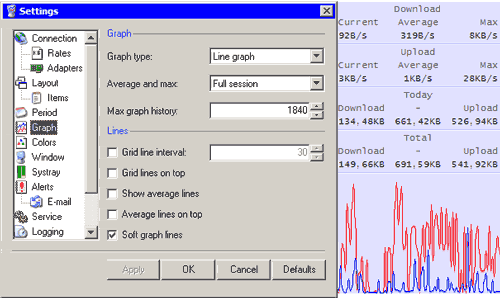
Bandwidth Monitor Pro 1.3


Do you ever wonder how much bandwidth you are using?
How fast you are downloading or uploading?
Or if you're closing in on your monthly transfer limit?

If so, Bandwidth Monitor Pro is the utility for you.

DOWNLOAD :

RAPIDSHARE LINK

Password :

http://www.thesaltinez.com/


Source : thesaltinez.com

Wednesday, March 21, 2007

VISTA TRANSFORMATION PACK


At last, Vista Transformation Pack has finally come out! Despite the name Vista, you'll
get whole new update and more functions. Get the awesome Vista look today!

Vista Transformation Pack will give to your Windows XP system the new and cool look
of Microsoft's future operating system: Windows Vista. The pack changes most of the
system icons, skins and toolbars and also adds new enhancements to your desktop such as
a dock bar or a different system tray clock

You sure will be surprised if you hear this. From now on you can update Vista
Transformation Pack without uninstalling and you can even integrate Vista
Transformation Pack into Windows setup files. (Still experimental, though but most
of them are fine enough to be implemented)

This release has a lot of update covering from build 5472 so you’ll get much more
icons update and much better visual styles and WindowBlinds skin, with bugs from earlier
release fixed. Let’s see the changelog for more details below.
Code:
http://rapidshare.com/files/21817338/vistaTp_www.thesaltinez.com.rar


Pass:
Code:
http;//www.thesaltinez.com/


Source : thesaltinez.com

Tuesday, February 27, 2007

How To Speed Up Windows XP Start Menu

In order to speed up the Start Menu display in Windows XP, there’s a simple registry setting you can change. Run ‘regedit’ from your command line and look for the following key:


HKEY_CURRENT_USER\Control Panel\Desktop\MenuShowDelay


You’ll see a value here for 400, by default. Try changing this to something smaller, like 100 or less. For maximum speed, change it to Zero.

Next, to make things even more efficient, you can turn off the menu shadowing, by going into your Display Properties, click the Appearance tab, click Effects, and then uncheck the option “Show menu shadow”.

Sunday, February 25, 2007

What is a switch

A network switch, or bridge, is a specialized device that connects multiple network segments. It's a more modern and efficient form of the ubiquitous (and outdated) network hub. A hub, also known as a repeater, is a simple device that has been used for years to connect all nodes, or computers, on a network to a central location. Each node on a network has a unique hardware address called a MAC address. A hub is known as a repeater because when a packet of data, or frame, is sent through the hub, it is repeated to each and every computer on the network.

This means that if a 1 GB video is sent to one computer through the hub, the file will also be sent to all of the other computers on the hub. This is very inefficient for bandwidth management. "Hubs have two major drawbacks," says Ben deGonzague, a deployment engineer with TopCoder Software, a Glastonbury, Conn.-based software engineering firm. "First, network bandwidth is consumed as each and every frame is sent to all devices on a network. Second, your network is only as fast as the slowest device. Hubs have become obsolete with switching-based networks."

A switch-based network is one that utilizes switches instead of hubs. A switch is a major upgrade to a hub. Instead of sending all network data to each and every network node, the switch will analyze the MAC address and determine where to send the data. Network bandwidth is not wasted by sending every frame to every port.

So when a switch receives data for a file, if it was addressed to one computer it will only be sent there. The other computers on the network wouldn't know about it. This means that the network is now much more efficient, but it's also a step toward being more secure: "Since switches can segregate traffic from different nodes," says deGonzague, "this makes it more difficult for anyone to capture packets on your network."

Thursday, February 15, 2007

What is virtual memory and when it is used?

The use of virtual memory is not visible to the PC user. Which means while working at the computer we will not know whether the virtual memory is being used as there will be no indication.

The reason will be obvious if you know how virtual memory functions. Usually the RAM memory in computers are now either 256 or 512 MB. Some computers also have 1Gb RAM memory.

But this RAM size is not sufficient for most of the tasks that we do in computers. For example after we start the computer and open MS Word and MS outlook, then the RAM memory is occupied by these applications. Therefore if we open more applications without closing the existing applications then the RAM memory is not enough.

While opening another application, the operating system will see which are the applications currently not in use and then move those unused applications to the hard disk temporarily. Therefore temporarily the RAM memory is free and can be used by this new application. This happens automatically by the operating system and therefore not visible to the PC user. This is called virtual memory.

Sunday, February 11, 2007

Broadband? Broadband choosing tips

These days we hear a lot about broadband Internet connection. In this article we will discuss the basics of broadband and tips to choose the right broad band plan for your home or office.

What is Broadband?

The definition of a broadband connection may differ between different countries. But generally you can say that any Internet connection with a minimum speed of 256Kbps and above can be considered as a broadband connection

In a 'Dialup' connection, we dialup whenever we need to connect to the Internet and then close the connection when we have finished using the Internet.

But you can connect your computer to Internet 24 hours a day and 7 days a week. In other words it is 'Always On'. Broadband connection is an always on connection. Your computer will be always connected to the Internet.

While using a dialup connection the maximum speed of the connection is only 56Kbps. Moreover when you are connected to the Internet using your phone dialup line, you cannot make or receive phone calls.

Broadband may be available in your area in any of these forms, Copper, Fiber Optics, cable, ADSL, IP VPN or Wireless.

What you need to ask before choosing your broadband provider.

01. Which broadband technology the provider is using

02. What is the monthly subscription and what is the one time set up fee

03. What is the speed of the broadband? Most of them just tell you the download speed. Ask them about the upload speed also.

04. What is the bandwidth allowed? That means how much data can be downloaded or uploaded. If there is a limit then what is the charges for additional data usage.

05. Is free email provided? If yes what is the storage capacity

06. What software and hardware are required to use that broadband connection. Is the hardware proprietary or can be bought from anywhere?

07. Is the installation free or you have to do it yourself

08. What are other conditions such as contracts etc.

09. What is the support provided?